
Introduction
This document describes how to troubleshoot the Cisco Finesse Persistent Logging problem
Backgound Information
There are several options to collect Cisco Finesse client logs. One of these options is Persistent Logging. This is the procedure to set Perssistent Logging.
Step 1. Open the Local Storage Logs serviceability tool: https://<FQDN>/desktop/locallog

Step 2. Click on the button Sign in with Persistent Logging. A login screen is open with an additional query string parameter lls (local log Storage)
When the agent signs in, the client logs are collected in local storage. You can view the logs in the same page as where you set Persistent Logging: https://<FQDN>/desktop/locallog. However, an issue was found, that even after Persisten Logging is configured, the logs do not show in the local log page https://<FQDN>/desktop/locallog. This problem is described with more detail in the caveat CSCvf93030  Persistent logging fails to capture logs - Finesse 11.5(1) ES-2 onward.
Problem
Based on the query string passed (lls), the local storage flag enableLocalLog is set to true. and local logs are collected. But currently the request.getQueryString() method returns an empty string instead of the query string itself, this is due to the missing key-value pair for lls.
Solution - Workaround
Once Persistent Logging is set and the agent signs in, you should see the value true added to the parameter lls.
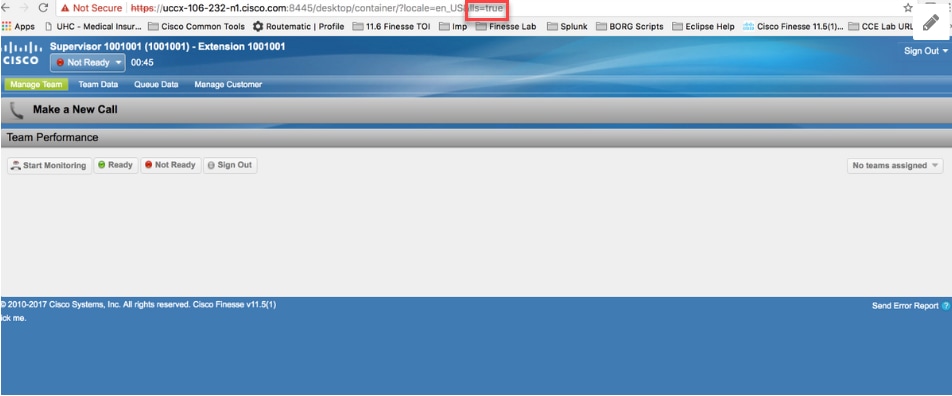
When the problem happens, on the the agent deskop, you see that the value of the IIS parameter is null: http://<FinesseServerIP>/desktop/container/?locale=en_US&lls

And the local logs do not get updated.

As a workaround, assign the value true to the parameter IIs in the url of the agent desktop https://<FinesseServerIP>/desktop/container/?locale=en_US&lls=true

You see now the information in the local storage https://<FQDN>/desktop/locallog.

Copy the contents into a text file and save it in order to share it with a Cisco representative.