https://www.uccollabing.com/find-jabber-chat-history-location-and-read-chat/
How to read Cisco Jabber Chat History and store it as a backup?
Do you know that you can read jabber chat history and it can also be stored as a backup? You don’t need to copy chat history to a text file and save it. Just copy the file to your backup location and that’s it.
Where the Jabber chat history is stored?
Some organization maintains a chat history while some does not maintain chat history. If your organization maintains a chat history, you can always take a backup of your chat history. Jabber for windows will create a history of last 99 messages in an IM conversation. These will shown in a greyed out state to indicate history when a IM conversation is opened. When a conversation reaches 100 messages the client will loop and overwrite the history. So it is always good to create a backup before your conversation reaches 99 and your history is overwritten.
The location is in the below path:
C:\Users\yourwindowsuserid\AppData\Local\Cisco\Unified Communications\Jabber\CSF\History
You would see a Database file which will look like This email address is being protected from spambots. You need JavaScript enabled to view it. (for example : If my windows user id is “support” then the file i will see something similar to This email address is being protected from spambots. You need JavaScript enabled to view it.). You need to copy that file to a folder and store it as a backup. Whenever you need to read the history, you can use the same file. I would recommend, you may rename the file from This email address is being protected from spambots. You need JavaScript enabled to view it. to This email address is being protected from spambots. You need JavaScript enabled to view it. so that whichever date file you need, you can locate that file easily.
Note: You can also create a batch file which will copy the file from above folder to your backup folder automatically. This will automate and ease your process.
How to read db file?
Now you may be wondering that how do you read a db file? Yes, even i am not very much familiar with database SQL file but i came across couple of tools which does allow you to read db files easily without any knowledge of commands.
- Download DB Browser for SQLite and install it on your machine. The installation is quite simple and easy.
- To read the db file, just launch DB Browser for SQLite from Start Menu
- Click on File > Open Database > Locate to the file you want to read
- Click on Open
- Click on Browse Data tab
- Table > Select history_message from drop down and you will be able to see the history
- Click on Payload to read the message
-
- The chat message will be encoded in between HTML codes. Check the example below.
How are you?
- The chat message will be encoded in between HTML codes. Check the example below.
-
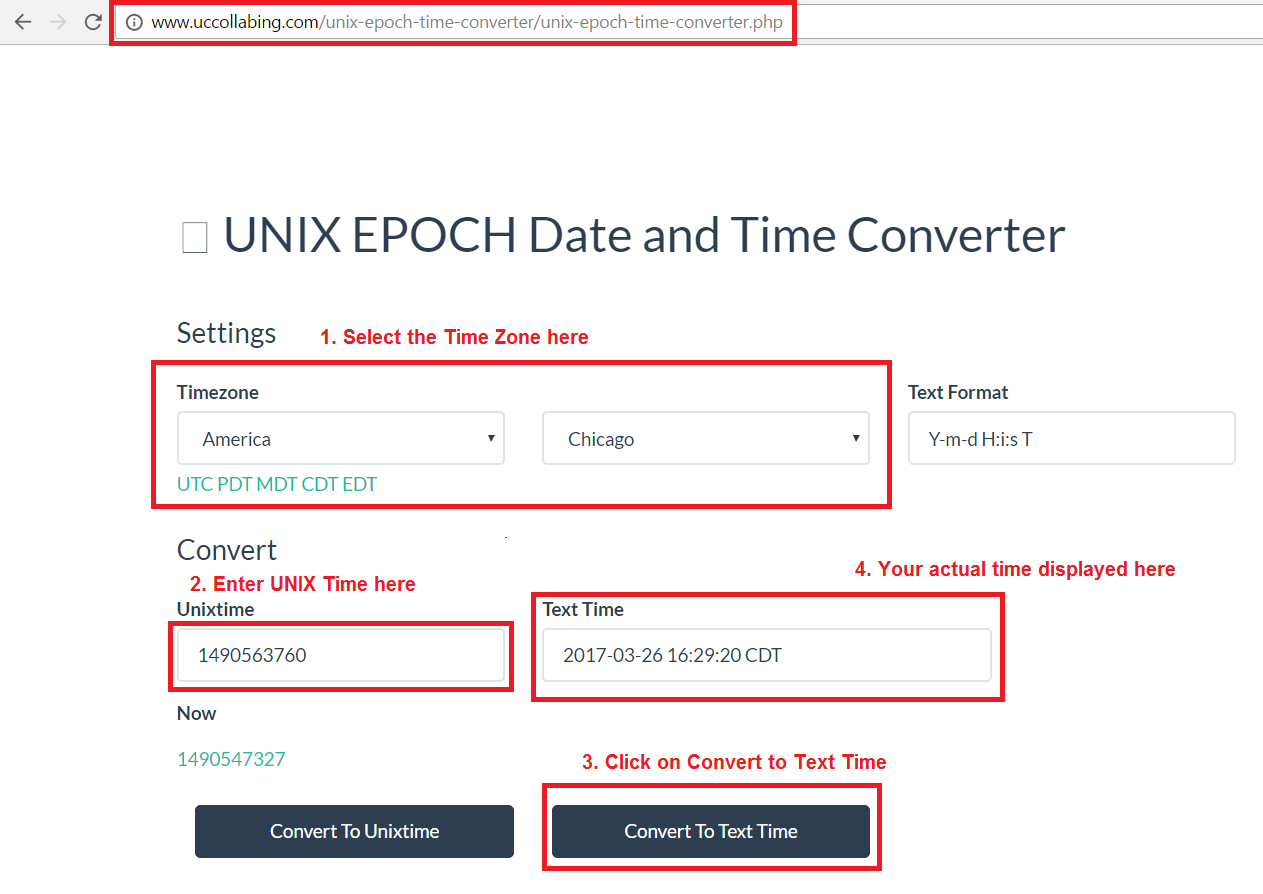
- Click on date to read the date which will be in unix format. You need to convert unix value into a readable format. You can convert that using the below link :https://www.uccollabing.com/unix-epoch-time-converter/unix-epoch-time-converter.phpThe unix date may be around 16 digit long – For example – 1490563760000000
You need to only take first ten digits which would be 1490563760
Now put this 10 digit into the link shared above and convert to Text Time as per the timezone you prefer

- Now click on sender to see the sender email address.

If you would like to check the history of calling numbers or called numbers > Click on Table drop down menu, you would find an option history_participant which will give you a list of the calling/called numbers,
Hope this helps!